RENTAL & CAR SHARING

GPS Tracking for Rental Car Companies and Car-Sharing Fleets

Once a car leaves your lot, you only know what the renter tells you. A hardwired GPS tracker shows you where every car is, tells you when one leaves the area you allow, alerts you if someone tows it or tampers with the tracker, and lets you disable a car when a renter stops paying.

GPS Freight One works for rental car companies and car-sharing operators of any size: a monthly price per car, no contract, and remote engine disable included. Renting out trucks too? See GPS tracking for trucks and GPS tracking for box trucks.

Rental car GPS tracking from $11.99 per car per month · Remote engine disable included · No contract

No payment at sign-up. No contract.

Three sedans and an SUV parked in a row on a small rental office lot at sunset

What You Need to Know About Each Rental Car

Where is the car right now?

Live tracking with location updates every 1 to 30 seconds, in the app and on the web.

Did it leave the area the rental allows?

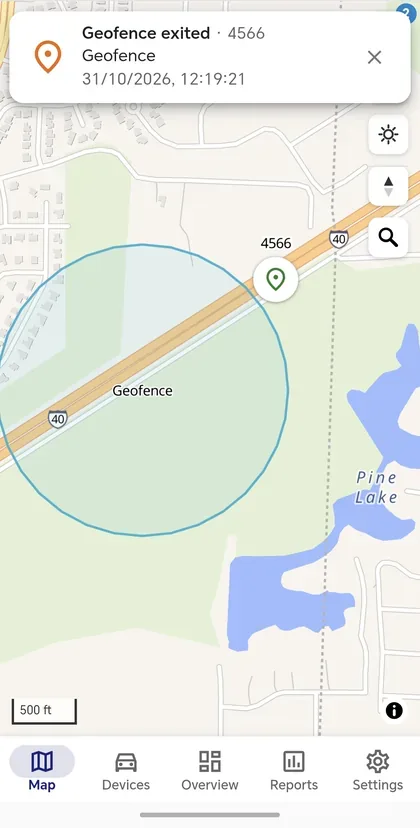
Geofence notifications when a car enters or leaves an area you set.

Is someone using it when they should not?

Alerts for ignition events, speeding and unauthorized movement.

Is it being towed?

Towing alerts.

Is someone trying to remove the tracker?

Tamper alerts; the tracker is hardwired and installed out of sight.

The renter stopped paying. Now what?

Remote engine disable from the app, included at no extra cost.

Where did the car go during the rental?

90-day trip history with routes and stops, useful when a renter disputes a charge.

All cars appear on one fleet dashboard, and the iOS and Android apps give you the same view on your phone.

Geofence Boundaries for Your Lot and Rental Area

A geofence is an area you draw in the app. When a car enters or leaves it, you get a notification. Rental and car-sharing operators typically set up:

  • Your lot or parking area, so you know when a car is picked up or returned
  • The area a rental is allowed to operate in, so you know when a car goes beyond it
  • Places a car should never go, such as areas you have excluded in your rental terms

Combine geofences with ignition and unauthorized movement alerts to spot a car that starts or moves when it is supposed to be parked, for example after business hours.

GPS Freight One mobile app map showing a vehicle just outside a circular geofence with a geofence exited notification
A "Geofence exited" notification in the mobile app.

Remote Engine Disable for Non-Payment and Unauthorized Use

When a renter stops paying or a car is used against your rental terms, you can disable it from the app with one tap.

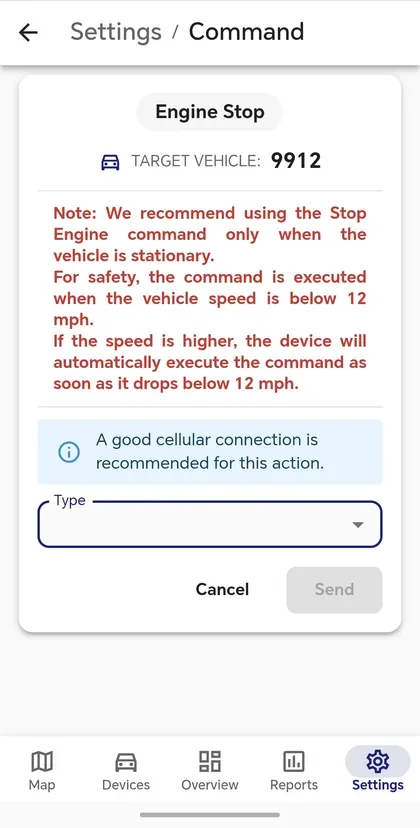
The command executes only when the vehicle is moving slower than 12 mph; if it is going faster, it waits until speed drops below 12 mph. It also works on a parked vehicle, and the vehicle cannot be restarted until you send the enable command. For safety, we recommend sending it only when the vehicle is stopped. Full details: remote engine disable.

On cars, a fuel pump cut can be used for engine disable. It is included in both plans at no extra cost.

You are responsible for how disable commands are used; see section 6 of the Terms and Conditions.

GPS Freight One app Engine Stop screen with the 12 mph safety note
The Engine Stop command in the mobile app, with the 12 mph safety note.

Tell Your Renters: Disclosure and State Laws

We recommend telling renters in the rental agreement that the car has a GPS tracker and can be remotely disabled. Laws on vehicle tracking, notice to renters and remote disabling vary by state, so have your rental agreement reviewed by your own attorney before you rely on these features.

  • Use the service only on vehicles you own, lease, manage or are legally authorized to monitor.
  • You are responsible for following federal, state and local laws on GPS tracking and driver consent.
  • GPS tracking depends on cellular and GPS signals; no tracker can guarantee that a vehicle is always located or recovered.

This page is general information, not legal advice. The binding rules are in sections 2, 4 and 6 of the Terms and Conditions.

Installing Trackers in Rental Cars

Trackers for cars are shipped to you anywhere in the US and installed by you, your own mechanic or any licensed auto-electric shop. The GFO-01 is a hardwired 4G LTE tracker, installed out of sight, with an internal backup battery (under 12 hours).

Installation guide and wiring diagrams are on the Guides & Manuals page. Shipping is $10 per order, free for 5 or more devices. In-shop installation at our Chicago service center is for trucks only.

Plans for Rental and Car-Sharing Fleets

Device Rental: $13.99 per car per month plus a $20 one-time setup fee; the device is returned if you cancel.
Buy Your Device: $11.99 per car per month plus $50 one-time for the device; you keep it.

No contract, cancel anytime, and you can add cars as your fleet grows. Fees, cost examples and return rules: Company Facts. How ordering works: Plans & Installation.

Rental Car GPS Tracking FAQ

Can I disable a rental car if the renter stops paying?

Yes. Remote engine disable is included in both plans. The command executes only when the car is moving slower than 12 mph, and we recommend sending it only when the car is stopped. Make sure your rental agreement tells renters about it and that it complies with the laws of your state.

Do I have to tell renters that the car has a GPS tracker?

We recommend telling renters in the rental agreement. Laws on tracking and remote disabling vary by state, so have your agreement reviewed by your own attorney. We cannot give legal advice.

Will I know if someone tampers with the tracker?

Yes. The tracker sends tamper alerts, and it is hardwired and installed out of sight, so it is harder to find and remove than a plug-in device.

Can I get an alert when a rental car leaves an allowed area?

Yes. Set a geofence around the area in the app, and you get a notification when a car enters or leaves it.

Who installs the tracker in a rental car?

You, your own mechanic or any licensed auto-electric shop. We ship the hardware anywhere in the US; the installation guide and wiring diagrams are on the Guides & Manuals page.

Track Your Rental Fleet

Create an account, choose rent or buy and the number of cars, and we ship the trackers. Questions about a larger fleet? Call (312) 585-8605.